Project Root
A full-stack Next.js-based application that serves as a proving ground for address components linked
NJ Municipality Geocoding Application
A full-stack Next.js-based application that serves as a proving ground for address components linked with New Jersey address geocoding and municipality lookup APIs. This application integrates with NJGIN APIs to provide accurate address validation, municipality identification, and properly-formatted addresses suitable for government agency submissions.
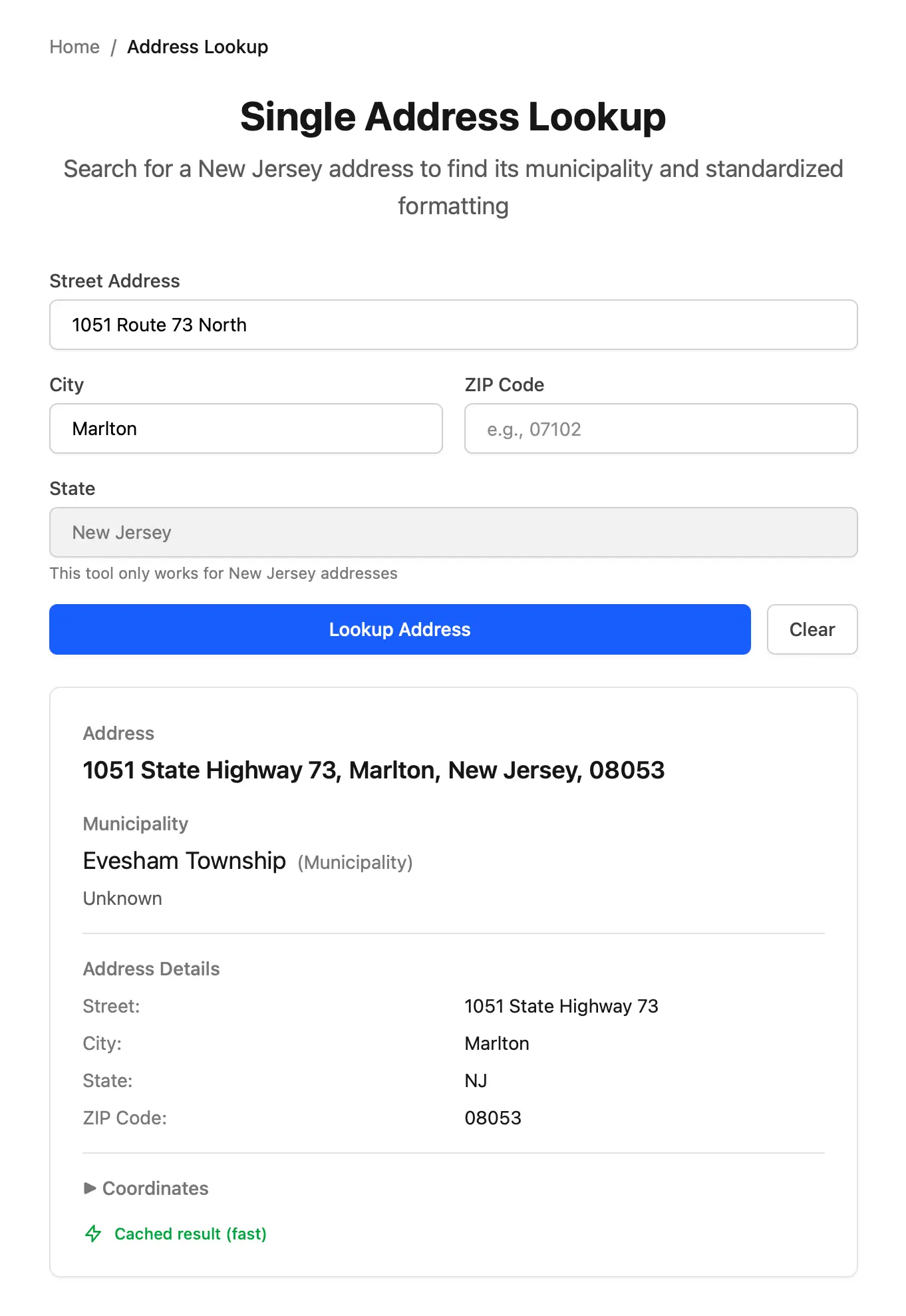
Table of Contents
- Overview
- Key Features
- Architecture
- Installation
- Development
- Running the Application
- Building for Production
- Building a Single Executable
- Testing
- Configuration
- API Endpoints
- Project Structure
- Deployment
- Contributing
- License
- Contact
Overview
The NJ Municipality Geocoding Application is designed to solve a common problem in government services: accurately identifying municipalities to standardize addresses for New Jersey locations. This application serves as both a functional tool and a demonstration of well-architected and reusable code that can be integrated into other applications.
What This Application Does
- Single Address Lookup: Provides real-time address auto-suggestions as users type, then returns the official municipality and properly-formatted address
- Bulk Address Processing: Processes up to 1,000 addresses at once via textarea input, with downloadable CSV results
- API Testing Interface: Allows individual testing of the NJ auto-suggestions and geocoding APIs for debugging and validation
- Health Monitoring: Exposes health check endpoints for both the application and external NJ API services
Why This Application Exists
Government agencies need accurate municipality data for routing services, processing applications, and maintaining records. Addresses can be entered in various formats, and manual municipality lookup is error-prone and time-consuming. This application automates the process while demonstrating software architecture best practices that can be reused across other New Jersey government applications.
Key Features
Core Functionality
- Real-time Address Auto-Suggestions: As users type, the application queries the NJ state government address database and displays matching suggestions within 500ms
- Municipality Identification: Returns the official municipality name (e.g., "City of Newark", "Borough of Princeton") for any valid NJ address
- Agency-Formatted Addresses: Provides properly-formatted addresses suitable for submission to government agencies
- Caching: 7-day cache with hybrid LRU/LFU eviction policy, storing up to 16,384 most-accessed addresses to improve response times
- Bulk Processing: Upload and process up to 1,000 addresses simultaneously with CSV export of results
- Error Handling: Error messages for incorrect or unsupported addresses, API timeouts, and network issues
- Accessibility: WCAG 2.2 AA compliant with full screen reader support
Technical Features
- Progressive Web App (PWA): Installable on mobile and desktop with offline static asset caching and native app experience
- Hexagonal Architecture: Clean separation between domain logic, adapters, and presentation layers enables code reuse across applications
- Framework-Agnostic Domain Layer: Core business logic is written in pure TypeScript with no Next.js or React dependencies
- Configurable Retry Logic: Exponential backoff retry strategy for API calls with configurable parameters
- Cache-First Strategy: Always checks cache before making API calls, dramatically improving response times for frequently-accessed addresses
- Performance Optimized: Single lookups finish in under 2 seconds (cached) or 5 seconds (uncached), bulk processing handles 1,000 addresses in under 60 seconds
- No Authentication Required: NJ state government APIs are public and require no API keys
Performance Targets
- Single address lookup: <2s (cached), <5s (uncached)
- Address auto-suggestions: <500ms response time
- Bulk processing: 1,000 addresses in <60s
- Health checks: <1s response time
- Cache hit rate: >60% after initial usage
Architecture
This application demonstrates hexagonal architecture (also known as ports and adapters architecture), which provides clear separation of concerns and enables the domain logic to be reused across different applications.
Architecture Layers
Why Hexagonal Architecture?
- Testability: Domain logic can be tested independently without framework overhead
- Reusability: The domain layer can be extracted and used in other applications
- Maintainability: Clear boundaries prevent coupling and make changes easier
- Flexibility: Adapters can be swapped (e.g., switch from in-memory cache to Redis) without affecting domain logic
- Framework Independence: Domain logic survives framework upgrades and migrations
Built With
- Next.js - React framework with App Router and Server Actions
- Bun - Fast JavaScript runtime and package manager
- TypeScript - Type-safe JavaScript
- Tailwind CSS - Utility-first CSS framework
- ShadCN UI - Accessible component library with BaseUI styling
- Vitest - Fast unit and integration testing
- Playwright - End-to-end testing framework
- NJ Geographic Information Network APIs - Address auto-suggestions and geocoding services (no API key required)
Installation
Prerequisites
- Bun >= 1.3.0 (install from bun.sh)
- Node.js >= 18.0.0 (for compatibility tooling)
- Git for version control
Step-by-Step Installation
-
Clone the repository
gh repo clone newjersey/business-address-lookup cd business-address-lookup -
Install dependencies
bun installThis will install all required dependencies using Bun's fast package manager. The lock file (
bun.lockb) ensures reproducible installations. -
Set up environment variables
cp .env.example .env.localEdit
.env.localto configure the application for your environment. See Configuration for details on all available options. -
Verify installation
bun run buildThis will compile TypeScript and build the Next.js application. If the build succeeds, installation is finished.
Development
Starting the Development Server
bun run devThe application will be available at http://localhost:3000. The development server includes:
- Hot module replacement (HMR) for instant updates
- TypeScript compilation in watch mode
- Automatic browser refresh on file changes
- Detailed error messages and stack traces
Development Workflow
-
Make code changes in
src/directory -
Run tests to verify functionality:
bun run test -
Check code formatting:
bun run format:check -
Fix formatting issues:
bun run format -
Run linting:
bun run lint -
Run type checking:
bunx tsc --noEmit
Working with the Hexagonal Architecture
When adding new features:
-
Start with the domain layer (
src/domain/):- Define entities in
src/domain/entities/ - Create use case functions in
src/domain/use-cases/ - Define port interfaces in
src/domain/ports/ - Add custom errors in
src/domain/errors/
- Define entities in
-
Implement adapters (
src/adapters/):- Create adapter implementations of your ports
- Keep adapters focused on integration concerns
- Use dependency injection to wire up services
-
Build the UI (
src/app/andsrc/components/):- Create Next.js pages and routes
- Use Server Actions for data fetching
- Build accessible UI components with ShadCN
-
Write tests (
tests/and co-located*.test.tsfiles):- Unit tests for domain logic (isolated, fast)
- Integration tests for adapters (with real dependencies)
- E2E tests for user flows (Playwright)
Code Style Guidelines
- No classes unless necessary: Use factory functions with arrow syntax
- Small, focused functions: Each function should do one thing well
- JSDoc Documentation: All public functions must have JSDoc comments with examples
- Type safety: TypeScript strict mode is enabled; avoid
anytypes - Idempotency: Functions should be idempotent where possible
- No side effects: Document all side effects in JSDoc
- Accessibility first: All UI components must meet or exceed WCAG 2.2 AA standards
Running the Application
Development Mode
bun run devStarts the development server with hot reloading at http://localhost:3000.
Production Mode
bun run build
bun run start
Builds the optimized production bundle and starts the production server.
Running Tests
# Run all tests (unit + integration)
bun run test

# Run tests in watch mode
bun run test --watch

# Run tests with coverage
bun run test:coverage

# Run E2E tests
bun run test:e2e

# Run E2E tests in UI mode
bun run test:e2e --ui
Linting and Formatting
# Check code formatting
bun run format:check

# Fix code formatting
bun run format

# Run Oxlint
bun run lint
Building for Production
Standard Production Build
bun run buildThis creates an optimized production build in .next/ directory with:
- Minified JavaScript and CSS
- Optimized images
- Static page generation where possible
- Server-side rendering for dynamic routes
Starting the Production Server
bun run startStarts the Next.js production server on port 3000 (or the port specified in your .env.local).
Environment Variables for Production
Ensure you set the following in your production environment:
NODE_ENV=production
PORT=3000
CACHE_MAX_ENTRIES=16384
CACHE_TTL_DAYS=7
NJ_GEOCODING_BASE_URL=https://geo.nj.gov/arcgis/rest/services
NJ_API_TIMEOUT_MS=10000
NJ_API_MAX_RETRIES=3
See Configuration for all available options.
Building a Single Executable
Bun supports compiling your application into a single executable binary that bundles the Next.js server, all dependencies, and the Bun runtime.
Why Build an Executable?
- Simplified Deployment: One file to deploy, no need to install dependencies
- Version Lock: Ensures exact runtime and dependency versions
- Faster Startup: No package resolution or module loading overhead
- Isolated Environment: No conflicts with system-wide Node.js or npm
Creating a Standalone Executable
-
Build the Next.js application first:
bun run build -
Create the executable:
bun build --compile --minify --sourcemap ./src/server.ts --outfile nj-geocodingThe repository includes
src/server.tsas the entry point for standalone builds.Note: The CI pipeline automatically tests SEA builds on Linux and macOS to ensure they work correctly. Build artifacts are available in GitHub Actions runs.
-
Run the executable:
# Show help and available commands
./nj-geocoding help

# Start the web server
./nj-geocoding --server

# Run CLI commands
./nj-geocoding version
Executable with Custom Configuration
You can create an executable that includes configuration:
# Set environment variables before building
export NODE_ENV=production
export PORT=3000
bun build --compile --minify ./src/server.ts --outfile nj-geocoding
Distribution
The resulting executable can be distributed as a single file. Users need to:
- Download the executable
- Make it executable:
chmod +x nj-geocoding - Run CLI commands:
./nj-geocoding helpor./nj-geocoding version - Start web server:
./nj-geocoding --server
Limitations
- The executable is platform-specific (Linux x64, macOS arm64, etc.)
- You need to build separately for each target platform
- Environment variables should still be configurable at runtime via
.env.localor shell environment
CLI Commands
The standalone executable defaults to CLI mode for quick diagnostics. Use the --server flag to
start the web server:
# Start the web server (requires --server flag)
./nj-geocoding --server

# CLI commands (default mode - no flag needed)
./nj-geocoding help                                    # Show help and available commands
./nj-geocoding version                                 # Show version information

# Standalone API testing (works without server)
./nj-geocoding test-geocoding "123 Main St, Newark, NJ"    # Test geocoding API
./nj-geocoding test-suggestions "123 Main"                 # Test address suggestions API

# Server diagnostics (require server running in another terminal)
./nj-geocoding health                                  # Check application health
./nj-geocoding health-api                              # Check NJ API connectivity
./nj-geocoding cache-stats # Inspect cache statisticsNote: The test-geocoding and test-suggestions commands work standalone and directly call the
NJ APIs. The health, health-api, and cache-stats commands require the server to be running in
another terminal.
Testing
The application uses a testing strategy with three levels of tests:
Unit Tests
Test domain logic and individual functions in isolation.
# Run unit tests
bun run test src/domain
bun run test src/adapters

# Run with coverage
bun run test --coverageLocation: Co-located with source files (e.g., src/domain/entities/address.test.ts)
Purpose: Verify business logic, entity behavior, and adapter functionality without external dependencies
Speed: Very fast (<100ms per test suite)
Integration Tests
Test adapters with real external dependencies (NJ APIs, cache).
# Run integration tests
bun run test src/adapters --grep integrationLocation: src/adapters/**/*.integration.test.ts
Purpose: Verify that adapters correctly integrate with external services
Speed: Slower due to network calls (~1-5s per test suite)
E2E Tests
Test end-to-end user flows through the UI using Playwright.
# Run E2E tests
bun run test:e2e

# Run in UI mode for debugging
bun run test:e2e --ui

# Run specific test file
bun run test:e2e tests/e2e/single-lookup.spec.tsLocation: src/__tests__/e2e/*.spec.ts
Purpose: Verify that the entire application works correctly from the user's perspective
Speed: Slowest, requires browser automation (~5-30s per test)
Test Coverage Goals
- Domain Layer: 100% coverage (pure logic, straightforward to test)
- Adapter Layer: 90% coverage (integration points)
- Use Cases: 95% coverage (critical business logic)
- UI Components: 80% coverage (focus on logic, not styling)
Running All Tests
# Run all tests (unit + integration + E2E)
bun run test && bun run test:e2e
Configuration
The application is highly configurable via environment variables. All settings have sensible defaults but can be customized for your environment.
Environment Variables
Create a .env.local file (copy from .env.example) and configure:
Application Settings
NODE_ENV=development           # Environment: development | production | test
PORT=3000                      # Server port
LOG_LEVEL=info                 # Logging level: error | warn | info | verbose | debug
Cache Configuration
CACHE_MAX_ENTRIES=16384                    # Maximum cache entries (16,384 = ~10-20MB)
CACHE_TTL_DAYS=7                          # Cache expiration time in days
CACHE_LRU_FREQUENCY_THRESHOLD=3           # LRU frequency threshold for eviction
CACHE_PROTECTED_FREQUENCY_THRESHOLD=5     # Frequency threshold to protect cache entries
ENABLE_CACHE=true                         # Enable/disable caching
Cache Eviction Policy: The application uses a hybrid LRU/LFU policy:
- Identifies the least recently used (LRU) entry
- If LRU has high frequency (>
CACHE_LRU_FREQUENCY_THRESHOLD), finds the least frequently used (LFU) entry instead - If LFU is highly protected (>=
CACHE_PROTECTED_FREQUENCY_THRESHOLD), rejects new cache entry - This protects frequently-accessed addresses while ensuring recent addresses aren't immediately evicted
NJ API Configuration
NJ_GEOCODING_BASE_URL=https://geo.nj.gov/arcgis/rest/services   # Base URL for NJ APIs
NJ_API_TIMEOUT_MS=10000                   # API request timeout (10 seconds)
NJ_API_MAX_RETRIES=3                      # Maximum retry attempts for failed API calls
NJ_API_RETRY_DELAY_MS=1000               # Initial retry delay (1 second)
NJ_API_RETRY_BACKOFF_MULTIPLIER=2        # Exponential backoff multiplier (1s, 2s, 4s, etc.)
ENABLE_API_RETRY=true                     # Enable/disable retry logic
Retry Strategy: The application uses exponential backoff:
- First retry after 1 second
- Second retry after 2 seconds
- Third retry after 4 seconds
- Configurable via
NJ_API_RETRY_DELAY_MSandNJ_API_RETRY_BACKOFF_MULTIPLIER
Performance Configuration
BULK_PROCESSING_MAX_ADDRESSES=1000       # Maximum addresses in bulk operations
SINGLE_LOOKUP_TIMEOUT_MS=5000           # Single lookup timeout (5 seconds)
BULK_LOOKUP_TIMEOUT_MS=60000            # Bulk lookup timeout (60 seconds)
SUGGESTIONS_TIMEOUT_MS=500              # Auto-suggestions timeout (500ms)
Feature Flags
ENABLE_CACHE=true                        # Enable/disable caching system
ENABLE_API_RETRY=true                   # Enable/disable API retry logic
ENABLE_HEALTH_CHECKS=true               # Enable/disable health check endpoints
Configuration Best Practices
- Never commit
.env.local: This file contains environment-specific settings and should be in.gitignore - Use
.env.local.example: Keep this updated with all available options - Validate on startup: The application validates configuration on startup and will fail fast with clear error messages
- Production values: Set conservative timeouts and retry limits in production to avoid cascading failures
- Cache sizing: Monitor memory usage and adjust
CACHE_MAX_ENTRIESbased on available RAM
API Endpoints
Web UI Routes
GET /- Landing page with application overviewGET /lookup- Single address lookup interfaceGET /bulk- Bulk address processing interfaceGET /test-api- API testing toolsGET /system-status- System health dashboard
Health Check Endpoints
Application Health
GET /api/system-statusReturns the health status of the application.
Response (200 OK):
{
  "status": "healthy",
  "timestamp": "2025-12-26T12:00:00.000Z",
  "uptime": 3600,
  "cache": {
    "entries": 1234,
    "maxEntries": 16384,
    "hitRate": 0.72
  }
}
Response (503 Service Unavailable):
{
  "status": "unhealthy",
  "timestamp": "2025-12-26T12:00:00.000Z",
  "error": "Cache service unavailable"
}
NJ API Health
GET /api/nj-api-statusChecks connectivity to NJGIN APIs.
Response (200 OK):
{
  "status": "healthy",
  "timestamp": "2025-12-26T12:00:00.000Z",
  "apis": {
    "geocoding": "healthy",
    "suggestions": "healthy"
  }
}
Response (503 Service Unavailable):
{
  "status": "unhealthy",
  "timestamp": "2025-12-26T12:00:00.000Z",
  "apis": {
    "geocoding": "timeout",
    "suggestions": "healthy"
  },
  "error": "Geocoding API is unreachable"
}
Server Actions
The application uses Next.js Server Actions for data fetching (not traditional REST endpoints):
lookupAddress(address: string)- Single address lookupgetSuggestions(query: string)- Address auto-suggestionsprocessBulkAddresses(addresses: string[])- Bulk processingtestGeocodingApi(address: string)- Test geocoding APItestSuggestionsApi(query: string)- Test suggestions API
Project Structure
Key Directories Explained
src/domain/: Pure TypeScript business logic with no framework dependencies. This layer can be extracted and used in other applications.src/adapters/: Implementations of the domain ports (interfaces). These adapters connect the domain to external services like APIs and caches.src/app/: Next.js App Router pages, layouts, and Server Actions. This is the presentation layer.src/components/: React components for the UI, built with ShadCN and accessible by default.src/lib/: Shared utilities used across layers.specs/: Feature specifications, implementation plans, and API contracts. These documents guide development..github/: CI/CD workflows for automated testing, linting, and building.
Deployment
Deployment Options
- Docker Container (recommended for production - see
Dockerfileanddocker-compose.yml) - Single Executable Application (one-file deployment - see Building a Single Executable)
- Traditional Server (Bun/Node.js hosting)
- AWS Amplify (see
amplify.yml)
Docker Deployment
This repository includes a production-ready Dockerfile and docker-compose.yml for
straightforward deployment.
Quick start with Docker Compose:
# Production build
docker-compose up app

# Development with hot reloading
docker-compose --profile dev up dev
Manual Docker build:
# Build the image
docker build -t nj-geocoding .

# Run the container
docker run -p 3000:3000 --env-file .env.local nj-geocoding
The Dockerfile uses a multi-stage build to create an optimized production image with:
- Slim base image
- Built-in health checks
- Environment variable configuration
- All dependencies bundled
Traditional Server Deployment
- Install Bun on your server
- Clone and build:
git clone <repository-url>
cd business-address-lookup
bun install --frozen-lockfile
bun run build- Start with process manager:
# Using PM2
pm2 start "bun run start" --name nj-geocoding

# Or systemd
sudo systemctl enable nj-geocoding
sudo systemctl start nj-geocoding
Environment Variables in Production
Ensure these are set in your production environment:
NODE_ENV=productionNJ_GEOCODING_BASE_URL(verify it's the correct production URL)CACHE_MAX_ENTRIES(adjust based on available memory)NJ_API_TIMEOUT_MS(consider higher values for production reliability)- All other configuration as needed
Health Check Integration
Configure your load balancer or orchestrator to use the health check endpoints:
- Liveness probe:
GET /api/system-status - Readiness probe:
GET /api/nj-api-status - Expected response: 200 OK with
"status": "healthy"
Performance Monitoring
Monitor these metrics in production:
- Cache hit rate (target: >60%)
- API response times (target: <5s for single lookups)
- Error rates (target: <1%)
- Memory usage (cache should stay under configured limits)
- Health check response times (target: <1s)
Contributing
We welcome contributions to improve the NJ Municipality Geocoding Application! Whether you're fixing bugs, adding features, or improving documentation, your help is appreciated.
How to Contribute
-
Fork the repository
-
Create a feature branch:
git checkout -b feature/amazing-feature -
Make your changes following our code style guidelines
-
Write tests for your changes
-
Run the test suite:
bun run test && bun run test:e2e bun run lint bun run format:check -
Commit your changes:
git commit -m "feat: add amazing feature"Use Conventional Commits format
-
Push to your branch:
git push origin feature/amazing-feature -
Open a Pull Request with a clear description of your changes
Contribution Guidelines
- Follow the hexagonal architecture: Keep domain logic separate from framework code
- Write tests: All new features require tests (unit, integration, and E2E where appropriate)
- Document your code: Add JSDoc comments to all public functions
- Maintain accessibility: All UI changes must meet WCAG 2.1 AA standards
- Keep it straightforward: Bias for readability and maintainability over cleverness
- No breaking changes: Unless absolutely necessary and explicitly documented
Code Review Process
- Automated checks must pass (tests, linting, formatting)
- At least one maintainer approval required
- All discussions must be resolved
- No merge conflicts with main branch
Reporting Issues
Found a bug or have a feature request? Please open an issue with:
- Clear description of the problem or feature
- Steps to reproduce (for bugs)
- Expected vs. actual behavior
- Screenshots or error messages (if applicable)
- Your environment (OS, Bun version, browser)
License
This project is licensed under the MIT License. For more information, see LICENSE.
The MIT License allows you to:
- Use the software for any purpose
- Modify the software
- Distribute the software
- Use the software privately or commercially
With the following conditions:
- Include the original copyright notice
- Include the license text
Contact
New Jersey State Office of Innovation
If you want to get in touch with the Office of Innovation team, please email us at team@innovation.nj.gov.
Support
- Issues: GitHub Issues
- Discussions: GitHub Discussions
- Security: See SECURITY.md for security-related concerns
Join the Office of Innovation
If you are excited to design and deliver modern policies and services to improve the lives of all New Jerseyans, you should join the New Jersey State Office of Innovation!
Acknowledgements
Government Partners
- NJ Office of Information Technology (NJOIT) and the NJ Office of GIS (NJOGIS) for providing the geocoding and address suggestion APIs
- NJ Office of Innovation for supporting open-source development and modern software practices
Open Source Community
This project builds on the work of countless open-source contributors. Thank you for making software development better for everyone.